Great little dock hub, but cables everywhere
I replaced an older Dell docking station with this, connecting it to my MacBook Pro, an older HDMI monitor, a wired keyboard, wireless mouse and keyboard receivers, a monitor light, and an eight-port USB-A hub. Once everything was connected, it worked exactly the way I would expect a dock like this to work.The monitor did not connect immediately, but after unplugging and reconnecting both ends of the HDMI cable, it came on and stayed stable. That was likely the cable, not the hub. I was able to extend my display, and I did not have any flickering, repeated disconnecting, or the other connection issues that sometimes happen when a device is not getting along with your computer. Everything also came back quickly after the Mac woke from sleep or whenever I unplugged and reconnected the dock.I used a 100W Apple charger, and the MacBook charged normally, just as though it were plugged directly into the wall. One important heads-up is that the dock does not include its own power source, but it needs one. The pamphlet mentions in passing that it can use a charger up to 100W, but I did not catch that in the listing, so I was not expecting to need a full-on power source. Luckily I had a 100W Apple charger available. Since I only tested it with 100W, I cannot say how well everything would work with a lower-wattage charger. It would definitely be frustrating to discover that the computer is not charging normally or that one of the connected devices is not working because the dock isn’t getting enough power. Buying a new 100W charger, even an off-brand one, to be part of your desktop setup can easily add $30 or more to the total cost, which is significant compared with the price of the dock itself.The other thing potential buyers should think about is cable placement. The dock itself is much smaller than my old Dell station, but cables connect on all four sides. Once everything is plugged in, the amount of desk space it uses is much larger than my old dock because the cables stick out in all directions and need several inches before they can comfortably turn toward the back of the desk. The power input is also next to the cable that connects to the computer, so if that cable going to your computer is the “front,” the power cable has to turn back around on itself, further adding to cable noise and clutter. I would have preferred a design that took cable direction and desk organization more into account, with ports arranged so most of the cables could run toward the back of the desk instead of spreading out in every direction.I connected my eight-port USB-A hub because I needed more USB-A ports than the two available, but it also helped keep those additional cables organized in one direction, and my hub lets me turn individual ports on and off, which I find useful. The hub and everything connected to it worked without any problems. The built-in cable to the computer was long enough for my setup, the plugs felt secure, and the dock stayed in place once everything was arranged.Bottom line: This worked quickly and smoothly with my MacBook Pro, monitor, USB-A hub, and other peripherals, and it replaced my older docking station without any performance issues. The main things to know before buying are that you will need to provide your own high-wattage charger and that the port layout can create more cable spread than the dock’s small size suggests. I don’t have all the hardware or devices that would allow me to test every single feature or port, but it does what it is supposed to do and does it well.
BBig Ry
22 de julio de 2026
Works well
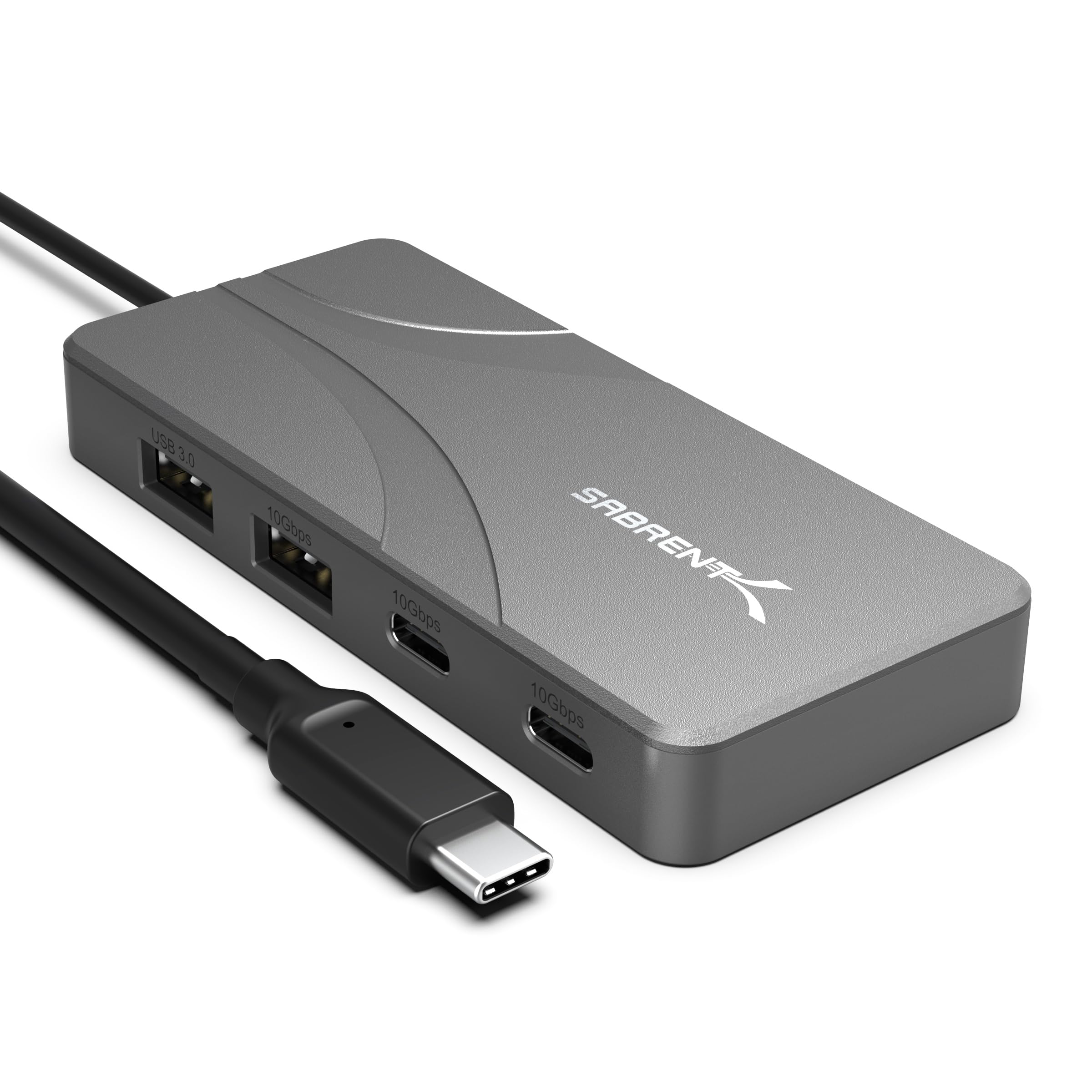
This compact USB-C hub is an excellent solution for expanding the limited number of ports found on many modern laptops and tablets. With four high-speed USB-C data ports, two USB-A ports, and support for pass-through power delivery, it offers a practical balance of connectivity without taking up much desk space. It's especially useful for users who regularly connect external SSDs, flash drives, smartphones, cameras, or other USB peripherals.One of the first things I noticed was the quality of the construction. The hub has a solid, well-built feel with a clean, minimalist design that fits nicely alongside modern laptops. Despite offering six additional ports, it remains compact enough to slip into a laptop bag or backpack, making it just as useful for travel as it is on a permanent desk setup.The port layout is thoughtfully designed. Having four USB-C ports is particularly valuable since many hubs still prioritize older USB-A connections. As more accessories transition to USB-C, this configuration makes it much easier to connect multiple modern devices simultaneously without constantly swapping cables. The two USB-A ports also remain useful for legacy peripherals such as keyboards, mice, thumb drives, and other accessories that haven't yet made the transition.Data transfer performance is excellent. The high-speed ports handle external solid-state drives, flash drives, and other storage devices without noticeable slowdowns, making large file transfers quick and efficient. Whether copying photos, videos, project files, or backups, the hub keeps up well with demanding workflows.The pass-through charging feature is another welcome addition. Connecting a compatible USB-C power adapter allows the laptop to continue charging while the hub remains in use, eliminating the need to sacrifice a valuable USB-C port simply to keep the computer powered. This is particularly convenient on ultraportable laptops that have very few built-in ports.Another strength is its plug-and-play simplicity. The hub was recognized immediately without requiring additional software or driver installation. Devices connected reliably, and switching between storage devices and accessories was seamless throughout testing.Even when several devices were connected at once, the hub remained stable and operated consistently. The enclosure became slightly warm during heavy data transfers, which is normal for a compact high-speed USB hub, but it never became excessively hot or showed any signs of instability.The only limitation worth noting is that this hub is designed primarily for data connectivity and charging expansion rather than serving as a full docking station. Users looking for HDMI, DisplayPort, Ethernet, SD card readers, or other specialized connections will need a different type of hub. However, for users whose primary need is adding multiple fast USB ports, this focused design is actually an advantage.Overall, this USB-C hub delivers excellent performance, modern connectivity, and reliable operation in a compact package. Its combination of four high-speed USB-C ports, two USB-A ports, dependable data transfer speeds, pass-through charging support, and quality construction makes it an outstanding choice for expanding the capabilities of today's USB-C laptops and tablets.
Capable for USB 10Gbit. Unusual use of HDMI chip for PD. Simple plastic case with recessed ports.
I found the model number confusing. It is called Omniport 6B, but the model is HB-UC7C (on box, and hub), very close to their other Omnihub models.== Hardware ==This is a plastic body hub. It has a metal plate under the lid for the hub heatsink, and maybe added weight.This hub is unusual because it uses a DP to HDMI chip despite having no display output. It looks like it is only there as a PD controller for managing the power input port.The USB ports all have good feel. USB C clicks in and retains well. The USB A ports are medium depth but still grip adequately.The attached cable is 25" (63cm) long. It has a hard TPU molding, and short strain reliefs on both ends.== Operation ==I used this hub with a Thinkpad X280. With the Thunderbolt 3 port I could achieve 10Gbit USB, and SSDs had no issue filling out that bandwidth. 5Gbit operation on other ports also worked as expected.I had some issue with USB 2.0 not always working, but I think it may be an issue with my laptop port wearing out. It seemed to depend on the USB C orientation.PD pass through worked great.These VIA VL822 have individual port power control. I tried using uhubctl to control power, but instead of removing power, the port was just disabled. It also had issue with port duality (matching the USB 2.0/3.0 hub ports to disable both together), I had to override the matching to disable USB 3.0 ports.== Internals ==The lid is secured with spaced ultrasonic welds. I had to flex the case a bit to get a shim started, but it pries apart pretty easily without damage.Chips:Via Labs VL822-Q8T - 4-port USB 3.1 Gen 2 Hub (2 integrated USB C Mux)GSCoolink GSV1201S - DisplayPort 1.2 to HDMI 1.4 w/ integrated PD 3.0 controller (only being used for the latter)2x Onsemi FUSB340 - USB C Mux (converts other 2 ports to USB C)Via Labs VL122-Q2 - 4-port USB 2.0 hubLinear Technology LT8304 - Flyback converter, Wide input voltage, up to 24W output (for deriving power from PD input)APM AP20P03DF - 20A P-channel MOSFETs (2 pieces)
Nearly a dock. Simple plastic case. Recessed ports. Blue LED. Needs DP1.4 for 4K60.
== Hardware ==This is a plastic body hub. It has a metal plate under the lid for the hub heatsink, and it gives it a little heft.Port feel is pretty good. USB C clicks and retains well. HDMI is too recessed, but the port itself is ok.The attached cable is 25" (63cm) long. It has a hard TPU molding, and short strain reliefs on both ends.== Operation ==I'm using this with a Thinkpad X280 which has older DP 1.2. Since the hub can only dedicate two lanes to graphics it was limited to 4K30 on the HDMI and USB C. 10Gbit USB worked fine with my Thunderbolt 3 port, and 5Gbit elsewhere still performed as it should.I also tested it with an Intel N100 system. That supports DP 1.4, and I was able to run a 4K60 display, and a second 1080p display from this hub (only had one 4K display).The VIA VL822 hub has individual port power control. Using uhubctl program I sent command to power off ports, and they were disabled, but remained powered. It also had issue with port duality (matching the USB 2.0/3.0 hub ports to disable both together), I had to override the matching to disable USB 3.0 ports.The hub gets warm, but always reasonable temps. I was expecting more heat output with how much is packed in it.It has a blue LED that shines out a hole on the cable side. I think only the side of the LED faces the hole so it doesn't cast light more than a foot or two.== Internals ==The lid is secured with spaced ultrasonic welds. I had to flex the case a bit to get a shim started, but it pries apart pretty easily without damage.Chips:Via Labs VL822-Q8T - 4-port USB 3.1 Gen 2 Hub (2 integrated USB C Mux)Via Labs VL103-Q4 - DisplayPort Alt mode and PD 3.0 controllerRealtek RTD2143 - DisplayPort MST Hub with HDMI 2.1 and DP++ outputsRealtek RTS5459 - Type-C & PD Power + Data/Video (could only find vague description, seems to handle the Video&Data USB C port)Onsemi FUSB340 - USB C Mux (enables the 3rd USB C port)Via Labs VL122-Q2 - 4-port USB 2.0 hubLinear Technology LT8304 - Flyback converter, Wide input voltage, up to 24W output (for deriving power from PD input)APM AP20P03DF - 20A P-channel MOSFETs (2 pieces)


 Marca: SABRENT