HHawk eye
15 de septiembre de 2026
The break I've been yearning for....
Growing up, I loved to read. I also grew up as a lifetime gamer. A good book was one of the very few delights that could pull me away from my Nintendo (which I still have and still play, some things won't change!).As I'm approaching middle age, I'm taking a more critical look at things, and have had to admit that like most, I spend too much time on screens. I'm an analyst in profession, so I'm at a PC all day. As I said, I still play video games, so that's more screen time. However, where I differ is instead of doom-scrolling, I'm always working to feed my insatiable curiosity. Where a peer of mine would be on TikTok speeding through videos or reading the news, I'm on YouTube watching a video about hornets (which I dislike, and they dislike me) or reading through pages of a software/coding forum.However, despite this difference, the core concern remains: Too much tech, too much screen, too much functionality. I've been yearning to take up reading again, and tried the usual: got a Kindle, liked it for a few months, then my curiosity saw me....well....use it beyond it's intended purposes. Simple as it was, I also didn't feel comfortable taking it around with me for fear of damaging it as well. I of course tried physical books, but I strongly dislike being interrupted to chat, and there's always someone who has to grab my book, read it's title aloud, and start bombarding me with commentary on it. So, I moved to the Kindle app on smartphone and tablet so as to remain incognito by way of passing off as another doom-scroller , but reading at night became an exercise in resisting sleep thanks to blue light and also reading stories that got my imagination or again curiosity going. So, the past five years or so have been a perpetual hope of finding something, anything, that would let me read on the go.Are you still reading this review? If so, I think you'll like this device, with a slight technical caveat. Also, if you're reading my review, you've read others. So, you know about this device's battery life, it's form, fit and function, so I will not waste more of your time going over such points again. But I will say that this device has been the catalyst I've been hoping for.It's tiny, and with the XTEINK X3 official case around it, I am very comfortable slipping this into my pocket and going about my day. While my mind is being stimulated due to reading old classic books, thus preventing night reading, I am much more at ease now. Instead of being caught up in internet trends on a smart device, I can take this device out, and read at will. As Vargas, R put so well in their review, it doesn't matter if I'm relaxed at home, standing in line at the market, sitting at a cafe, etc. I can read, not worry about someone grabbing it and wanting to drown me in their comments since there's no visible title, and this device is just modern-looking enough that I still appear to the uninterested observer to be yet another doom-scroller, just with an oddly tiny phone(?) in my hand. It's not a backlit screen, so there's no blue light concerns (although you'll need external light in the dark, as you would with a physical book) and battery life is superior. I also am gradually experiencing degrading vision and am already blind in my left eye, yet even I have this device's text size small (the smallest font size, but in bold) and have no eye strain.Now, to end my long-prefaced, short review, I'd like to discuss the software side, since that's where I observed most complaints before purchasing this device. I cannot speak for this device's reliability in wireless connectivity at any depth. While I'm not an IT expert, I would regard myself as tech-savvy, and feel I could test said connectivity. But since I want this device to be as "standalone" as possible, I simply removed the 16 GB MicroSD card this device came with, formatted on my PC, went to the Gutenberg Project's website, and spent an hour hand-selecting books of various genres. I downloaded them all first to my PC for archival, and copied the files to the MicroSD card. After ejecting the MicroSD card and inserting it into this X3, my full library uploaded to the card appeared without incident, and I immediately dove into my first book.So, it is here I return to my mention of a technical caveat. You will need to utilize IT to get this device going, be it Wi-Fi or card handling. But I found removing and working the card on my PC then reinstalling it to the X3 was painless and simple, so I would recommend that route to anyone that buys this and doesn't HAVE to have their new X3 connected wirelessly.
Amazing little device
I wanted something small, much more portable, and can read books without distractions and this delivers exactly those criteria.What the listing comes with:- Xteink x4 device- Two magsafe ring stickers to place on items that doesn't have magsafe (one white and one black)- A matte screen protect that you must apply yourself- A microSD- A microSD USBThere are CONS compared to other eReaders on the market such as:- No backlight- No touch screen- No highlighting- No apps, must upload the book yourselfPersonally, even though there are quite a few CONs they do not bother me at all. The backlight isn't a big issue, as you can pair it with a magsafe phone light or read with a lamp on. I personally do not read often at night, so this issue isn't such a big deal for me. No touchscreen is more of a pro for me than a con. I like that I can wipe the screen or hold the device without worrying I might touch the screen on accident and the pages flip. I always had that issue of accidental page flipping before on other types of eReaders so I appreciate the button only navigation. I am sad about not having the ability to highlight my books, but I can live without that function.Now let's actually talk about the pros. I love the size. There is another model (xteink x3 which is smaller) and I think the x4 is the perfect size to fit in the palm of your hand. It's also practically weightless. I always have issues with other eReaders where my hands get fatigue holding the device even with added accessories like a magsafe holder, a band, and a grip but it just adds more weight to the device, so it becomes less and less comfortable to use. The buttons are a bit customizable and are super responsive. I disliked that other eReaders sometimes does not register my finger when I tap the next screen. This is my first time having an eReader with buttons and it has been a dream to use. All the buttons are placed in areas where it feels natural when you hold the device so turning pages or holding the device isn't awkward nor tiresome. The customization is minimal but very nice, especially if you plan to use a custom firmware (which I HIGHLY recommend).Big tips from experience when you purchase this device:- Have a PC/laptop it makes uploading items to the device so much easier- Download community firmware! (Crosspoint, crosspet, or Inx) I personally like crosspoint- I haven't tried other firmware but if you do get crosspoint I found that the formatting can be weird sometimes if you upload an .epub file straight from the source. Sometimes I lose the select chapter function and other things. To prevent this, in my experience, download a program called Calibre and download .pdf files of your books. Convert them in Calibre to .epub files then upload those to the device. For some reason it saves the formatting of the .pdf better with individual chapters and pages so it's easier to select them. I'm not sure if it's just user error (probably is on my part) but I find uploading books this way makes the formatting better, readable, can select chapters/pages, and the font is more legible.Honestly, I plan to buy another device just to have as a back-up. 10/10 would recommend. If you are not negotiable on any of the CONs definitely do not buy. It is set as a very minimal device and that is exactly what it delivers.Images below are with crosspoint firmware installed.
JJeffrey M.
10 de septiembre de 2026
Choose a Rock Instead. It Will Be More Useful.
Maybe not the most frustrating device ever, but it sure is a contender.This arrived early today, and I fought with it most of the day. As I have done with other e-readers, I set out to get it set up, load some e-books on it, and start reading. Only, it flatly refused to let me do that. You have to use wi-fi for the set-up, so it wanted me to enter my wi-fi password. The Xteink x3 does not have a touch-screen. To enter data you have to move the cursor around the screen, select a letter, numeral, or symbol, and push a confirmation key for each one. Like most wi-fi passwords, mine uses a combination of upper- and lower-case, numbers, and symbols. To shift from lower-case to Capitals you have to move the cursor down to the "Caps" key at the bottom of the screen and choose it. This shifts all the letters to Capitals. Then you move the cursor back to the Capital letter you want, choose it, and then turn off Caps by moving the cursor back to the Caps key... I have become spoiled by touch screens, and I found this to be a chore. This was particularly the case with a small device with multiple buttons to move the cursor. Several times I had to back up to the item I wanted.Still, once you tell the device what your wi-fi password is and it saves it, you're good to go. At least, that's the way it has been on every other e-reader I have bought. Not this time.Once I finally got my password typed correctly, there was no obvious way to tell the device to enter it. Pushing the confirmation key that selected letters, etc. had no apparent effect. None of the other control buttons helped either. No matter what I tried, the e-reader wouldn't connect to wi-fi, or tell me it didn't, or do anything. I can't tell if the interface was non-intuitive, or if the device was defective, or if the engineers who designed this thing were simply inept. (Yes, my wi-fi router does use the 2.4G signal it says it wants.)I tried several times to get it to connect, turning the device off and back on, entering and re-entering (and re-re-entering) my wi-fi password, but nothing worked. Eventually I reached the limits of my patience and gave up.The Xteink x3 comes with an instruction manual, but the manual is as non-intuitive as the interface seemed to be. It has small blocks of English type interspersed with Chinese and Japanese text, and digging out the English instructions required careful searching for each step. Maybe there was an answer to my connection problem buried somewhere in the manual, but as I said, I reached the limits of my patience with this thing before I found it, if it's there.The only reason this is a 1-star review is that Amazon does not offer the option of 0-stars.
SSylvain
8 de septiembre de 2026
Great compact e-reader for the price
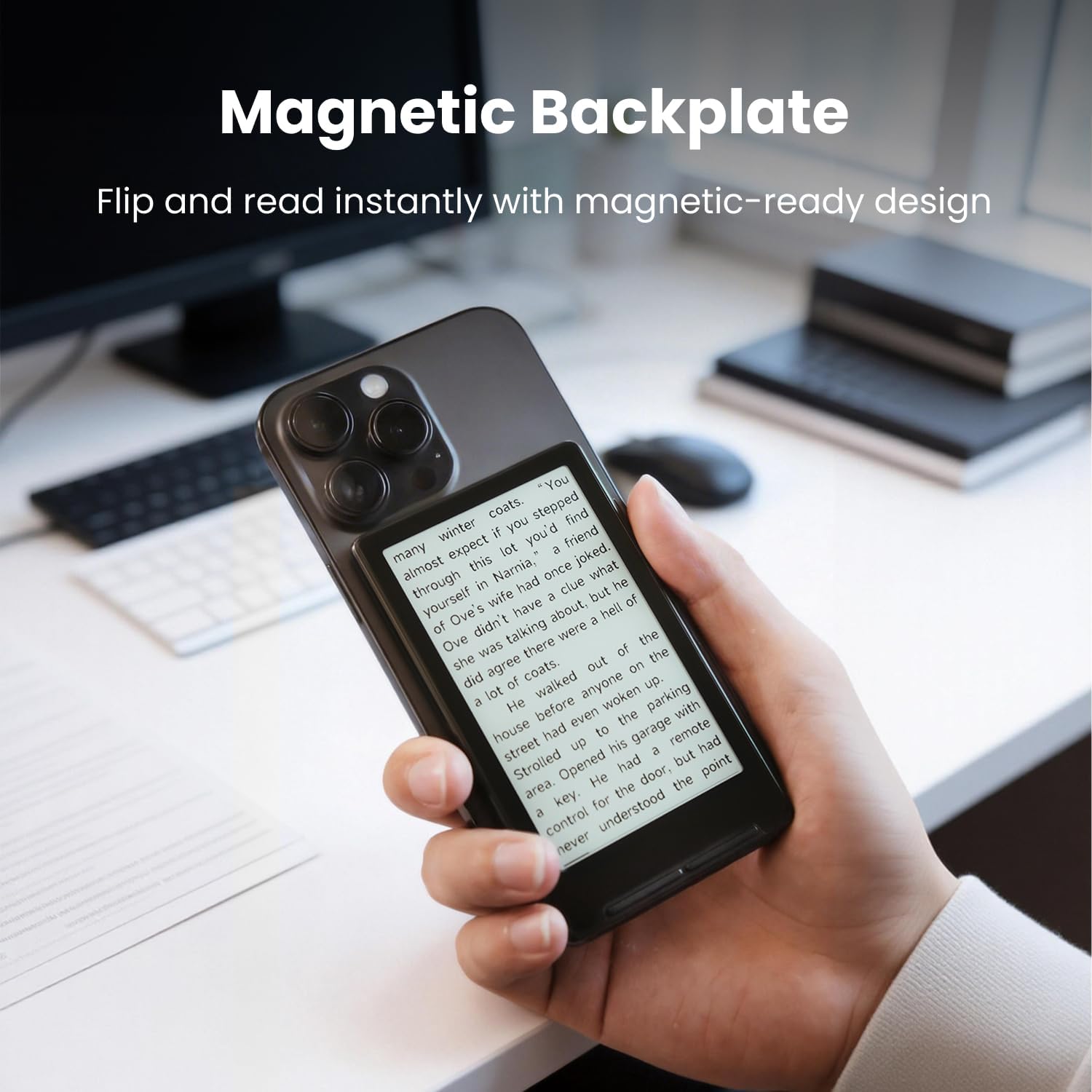
I love that little e-reader! It’s super portable, affordable, and the e-ink quality is really good.It’s really a decent device. I found the controls to be easy enough to use, and I was able to load ebooks directly using the hotspot feature which was nice.I swapped the stock 16GB Micro SD card with a larger one (although 16GB is more than enough to bring with).I ended up swapping the OS to Crosspoint. That was super easy to do, from their website. That gets me more controls over font size and better menu options, and sleep screens as well.The stock OS was really decent too to be fair. As mentioned in the description in comments, there’s no backlight, no USB-C and no touch screen. However for the size, price and convenience I find this a great purchase. The MagSafe is sticking good enough although I believe it’s missing the additional line below the ring to make it steady and stick in place rather than rotating a bit.I love the portability, it’s nice to have an e-reader that compact. I like being able to snap it behind my phone, have my books with me while I carry my phone and being able to read instead of scroll on my phone. Overall a great product and concept.




 Marca: XTEINK