HHappy to Share
20 de julio de 2026
Don't let the reviews scare you off — buttery low-profile that actually feels flat
The bad reviews make this keyboard out to be some kind of villain, but honestly? Don't let them steer you away.Build quality is amazing. Typing is smooth and buttery. Yes, it's on the louder side — not obnoxiously loud, but there's definitely some thock to it (lol). It just feels great to type on. Paired up with no issues at all, and I'm about to swap in Void switches, which you do have to buy separately.It gives off very Apple-ish vibes — like Apple themselves built this thing.The best part for me is the low profile. This is the first keyboard outside the Lofree Lite that actually feels truly low. Most keyboards claim "low profile" but still have an arch that tilts up a bit, which makes them hard to type on without a wrist rest. Not these. Your wrist can sit comfortably on the desk the whole time, so you don't have to keep your hands floating during long sessions. They do include feet if you want that tilt, but I love the flat-to-desk feel Apple keyboards originally had — it's a more natural position, kind of like typing on a laptop, with way less wrist strain.Good job, Lofree. I'll post an update once I swap the switches.
Best replacement for the K800
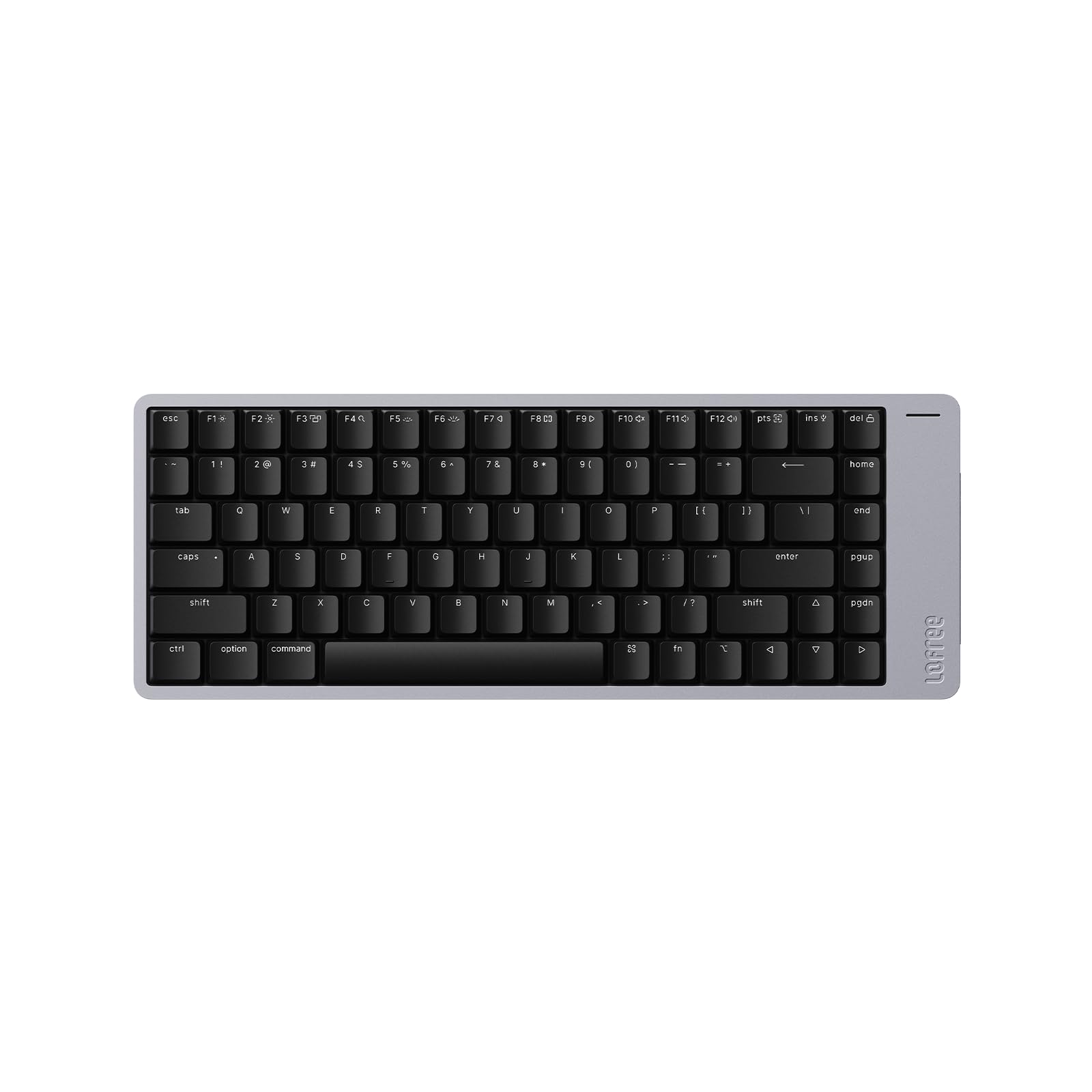
For those of you looking for a K800 replacement, I wrote this review for you.I promised that if I did find a keyboard out there that I thought was a suitable replacement I would post it on every review of the keyboards I've tried.The Flow 2 100 with Pulse switchesNow this is very different from the K800, but hear me out. I was fixed on the idea that the perfect keyboard had to match the K800 in feel and design. After trying this keyboard I had to rethink that mindset. This is a special keyboard. It's one of those products you know is good as soon as you use it. The keys are easy to press, but your typing remains precise. You can type fast on this keyboard without making mistakes. It sounds thocky, but never annoying or loud, it's quiet === It's pleasurable === Like the K800, it has shine thru lettering, a rarity these days. It has tilt and it's low profile. The chassis is top notch, you won't find a better quality chassis. The only thing that is missing is the standardized layout, so this may be a deal breaker for most and if you don't mind the metal protruding at the right, which I've read is to help dampen the sound. It's expensive, but the quality and performance justifies the cost.Other keyboards I've tried so far:ScissorsLogitech MX MechanicalLogitech K650Logitech K950Cherry Stream WirelessMechanical (Low Profile)Keychron K5 MaxNuphy Air96 v2Flow 100Flow 2 100Satechi SM3None of these feel like the K800. Most of the switches used in keyboards these days have a lighter feel to them. The K800 as you know has that medium to hard key action that let's you know you activated the key, so to speak.So is there a true replacement? Unfortunately no, at least from what I've tried so far, but this is the one keyboard that stood out among the rest. This one won't insult your intelligence. It's truly made for the keyboard enthusiast and for those who have high standards and those who desire quality. This one fits the bill.I still have a few more keyboards I'd like to try out. The Node 100 with Blush Nano switches and again the Nuphy Air96 v2 with Moss switches. The Moss switches are suppose to be their heaviest tactile switch, so this may feel closer to the K800 than the ones I've tried. However, the Flow 2 100 will still be hard to beat. If I don't update this review you'll know I found the Flow 2 100 to be the one.Rest in peace K800.
JJenka
8 de febrero de 2026
Wake up keyboard!
Good build, and stylish keyboard. Unfortunately, do you have to wake it up every time you use it that kills it for me.
A Mechanical Heartbreak: The Frustrating Contradictions of the LOFREE Flow2
A premium peripheral delivers an exceptional typing experience, yet falls short in nearly every other aspect.When setting up a new computer, the keyboard is often the most crucial input device, and it should function flawlessly from the outset. However, the LOFREE Flow2, a 100-key, Space Gray, aluminum alloy, low-profile mechanical keyboard equipped with pulse tactile switches, failed to meet this expectation. Upon unboxing, the physical connection immediately failed due to the incompatibility of the included USB cable. The Bluetooth setup was riddled with flaws, necessitating the use of the Wi-Fi dongle to establish a basic connection until the Bluetooth eventually stabilized.Architecture of InconvenienceUsing this device is an exercise in exasperation. Every time it wakes up, the software asks to identify the keyboard, only to conclude it can’t. The absurdity of the software experience is captured perfectly on screen, where the Mac Keyboard Setup Assistant bizarrely halts the process, claiming a “kensington.com device cannot be identified.” Meanwhile, the Bluetooth pairing menu becomes a congested mess, hanging with multiple duplicate entries for “Flow2-100@Lofree.”Once connected, the physical design reveals baffling choices. The keyboard forehead is placed in the wrong place, the right side, for most of the world. That’s where our mouse goes. In a standard desk arrangement, this extended right-side bezel encroaches awkwardly onto the desk mat, competing for the exact same real estate as the wireless mouse. I also keep accidentally touching the volume control on the side, which doesn’t do anything because I have an audio interface.A Customization BarrierWhile the key placement is good and admirably matches that of a Mac keyboard, the overall layout is bad. There are no delineations between the number pad and the main keyboard, and the function key glyphs and icons are not well thought out or easy to decipher. The ergonomic support is equally lacking; the keyboard risers have only one option, which is simply not enough for the many people who would like more rise.Then comes the astonishing laziness of the software experience. If you want to customize the keyboard at all, you must write in to support to have them send you the configuration file in order to engage with the keyboard via viaapp.com. The black backlighting is dim, offering only two lighting options, and turns off too quickly. To conserve battery, the keyboard backlight goes to sleep every 90 second. Overall, it sucks.Quiet TragedyIt’s a shame that this keyboard is so bad. However, there’s an incredible contradiction at the heart of this frustrating peripheral. Once you get past the right-side-of-your-forehead issue, the dim backlight, the high price, the lack of customization, and the useless volume control, the key billboard actually feels pretty good.This forces a terrible realization. I really don’t want to go back to an Apple keyboard, but I might have to. A keyboard should be a reliable tool, not a daily obstacle course. I think I’m going to return this.


 Marca: LOFREE