An Excellent Wired Keyboard for Mac Users
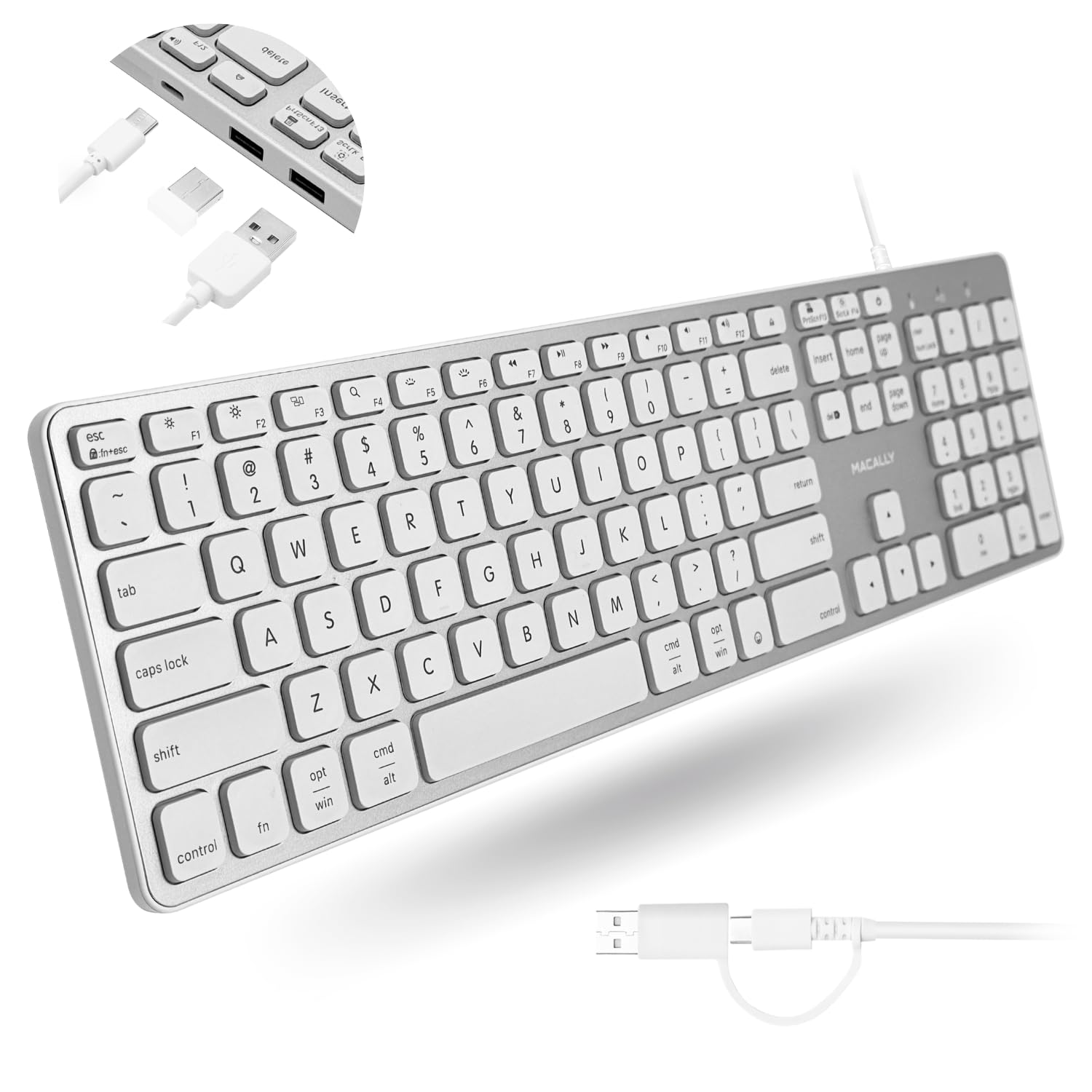
Ever since Apple stopped offering a wired keyboard, finding a truly satisfying replacement has been a challenge. As a journalist who spends hours typing every day, I have found that Bluetooth keyboards, regardless of brand, tend to suffer from the same issue: a slight but noticeable latency that can become frustrating for fast typists.Having used Macally products for many years, I decided to try the Macally Wired Keyboard for Mac with USB Hub (2x USB-A / 1x USB-C). It turned out to be an excellent choice.While the keyboard is not made entirely of aluminum like Apple's models and feels somewhat lighter, it offers several practical advantages. One of the most useful is its dual connectivity. It can be connected via either USB-C or USB-A, making it ideal for users like me who work with both older and newer Mac computers.Another standout feature is the backlighting. It is highly effective and easily adjustable, ranging from subtle to bright levels using the F6 function key. For anyone who often works in dimly lit environments, this is a genuinely valuable addition.The typing experience is also excellent. In fact, I prefer it to Apple's current keyboards. Apple's keys are extremely flat, whereas the Macally keys are ever so slightly raised, providing a more comfortable and satisfying feel during long writing sessions.Installation is straightforward. When first connected, macOS opens a keyboard identification window. Simply press the "Z" key when prompted and follow the on screen instructions to select the appropriate keyboard layout:ANSI (USA)Option 2: EuropeOption 3: AsiaIn my case, the backlighting was not activated immediately after installation. Pressing the F6 key solved the issue instantly.A thoughtful extra feature is the dedicated key marked with the same icon as the Mac power button, which puts the display into sleep mode. It is a small convenience, but one that quickly becomes useful in everyday work.Conclusion:This is probably one of the best wired keyboards currently available for Mac users. It is easy to install, comfortable to type on, and thoughtfully designed. The documentation is exceptionally clear, with all function keys and features explained in detail.Given Macally's long experience in the Mac accessory market, I would not be surprised to see the company eventually introduce a premium model with materials comparable to Apple's. Even so, considering the very reasonable price of this keyboard, it is difficult to imagine finding a better value today.
Ooldncranky
11 de julio de 2026
Great keyboard that doesn't cost a fortune.
This is exactly the keyboard I was looking for. The backlight makes it so much easier to use when the room is dim, as I often keep it. The integrated USB hub is nice for plugging in my wireless mouse receiver and having some extra ports convieniently located is nice plus. Both of those features are exactly what I was wanting. I use it with my Android tablet because I HATE touchscreen typing. The keys have a nice feel and operate smoothly. The integrated adapter offers the option of using a USB - A or USB-C port.
10/10, Must Buy
This keyboard is great!I had previously purchased a bluetooth keyboard under a different brand, but unfortunately, it didn't work for me. I had issues with the keyboard disconnecting frequently, numbers and letters not registering when I would type, and it would take forever to wake the keyboard up when it would go idle.I had also tried another keyboard before that that was also bluetooth, and I experienced issues with certain functions not working. I was fed up! So, naturally, I figured a wired keyboard was probably best. I was correct!To start off––I love the buttons on this keyboard. I recently switched from PC to Mac, and I didn't like that most Mac keyboards don't have raised, clunky buttons. These buttons, however, are slightly elevated and feel a lot nicer to type on. You get a very ASMR-like noise hehe. Not too loud, but smooth and enjoyable. The buttons also have soft indents, feeling nice against your fingertips when you type.The color is sleek, and the layout is really nice for office use. Another complaint that I had with my previous keyboard is that the screenshot button was right next to the backspace button, so I would constantly accidentally take screenshots when trying to delete a letter. I won't be having that issue with this keyboard, as the layout is more functional.While backlight buttons are listed as a feature, I find that you can't really tell, even when I have the backlit brightness up to it's full capacity. This isn't a huge issue, though.There's a slight amount of weight to this board, and overall, the quality is very nice. It's sleek, it looks nice, it feels nice, and it doesn't seem cheaply made. I also appreciate that this comes with both a USB-C and USB-A wire. I have a USB-A adaptor port, but if you don't, you'll still be able to use this keyboard.Set-up was very straightforward and easy, all you have to do is plug it in and configure some buttons. Very happy with my purchase!
EExodus
24 de julio de 2026
Great keyboard
I'm a super snob when it comes to PC peripherals. Working on them every day means you want professional high quality bits that last. I was skeptical at first as Macally is another random AI generated brand name, and I've never in my 30 years in technology have run across one in the wild. However, phantom keystrikes and misses from my Cherry keyboard lead me looking and I decided to give this a shot.The keyboard feels well made- its about twice the weight of AMZs generic offering. Works great on my macbook. The backlighting is fun, gets about half as bright as gaming keyboards but for the office its good. Keyshape is nice, clicks are good and feedback is responsive. macOS sometime cries that it doesn't know what kind of keyboard it is, but thats trivial. The USB hub on the back works great for my mouse jiggler and YUBI. Overall very happy. Time will tell if it survives, and if anything falls off the map here I'll be sure to update. Would recommend!