Especificaciones
- Usos recomendados
- Driveway & Garage Security, Front Porch & Entryway Security, Outdoor Security, Traffic & Parking Lot Monitoring See more
- Conectividad
- 2.4GHz (Not 5G Compatible), Bluetooth, Wi-Fi, Wired
- Other Special Features of the Product
- HD Resolution
- Indoor Outdoor Usage
- Indoor, Outdoor
- Controller Type
- Amazon Alexa, Google Assistant, IFTTT
- Mount Type
- Wall Mount
- Color
- White
- Formato
- Cube
- Installation Type
- Screw In
- Enclosure Material
- Acrylonitrile Butadiene Styrene (ABS)
- Alert Type
- Motion Only
- Light Source
- LED
- Effective Still Resolution
- 1296 pixels
- Photo Sensor Resolution
- 1296 pixels
- Control
- App, Push Button, Voice
- Connectivity Protocol
- Wi-Fi
- Wireless Technology
- Bluetooth, Wi-Fi
- Video Capture Format
- MP4
- Viewing Angle
- 160 degrees
- Field Of View
- 160 degrees
- Zoom Type
- Digital Zoom
- Dimensiones
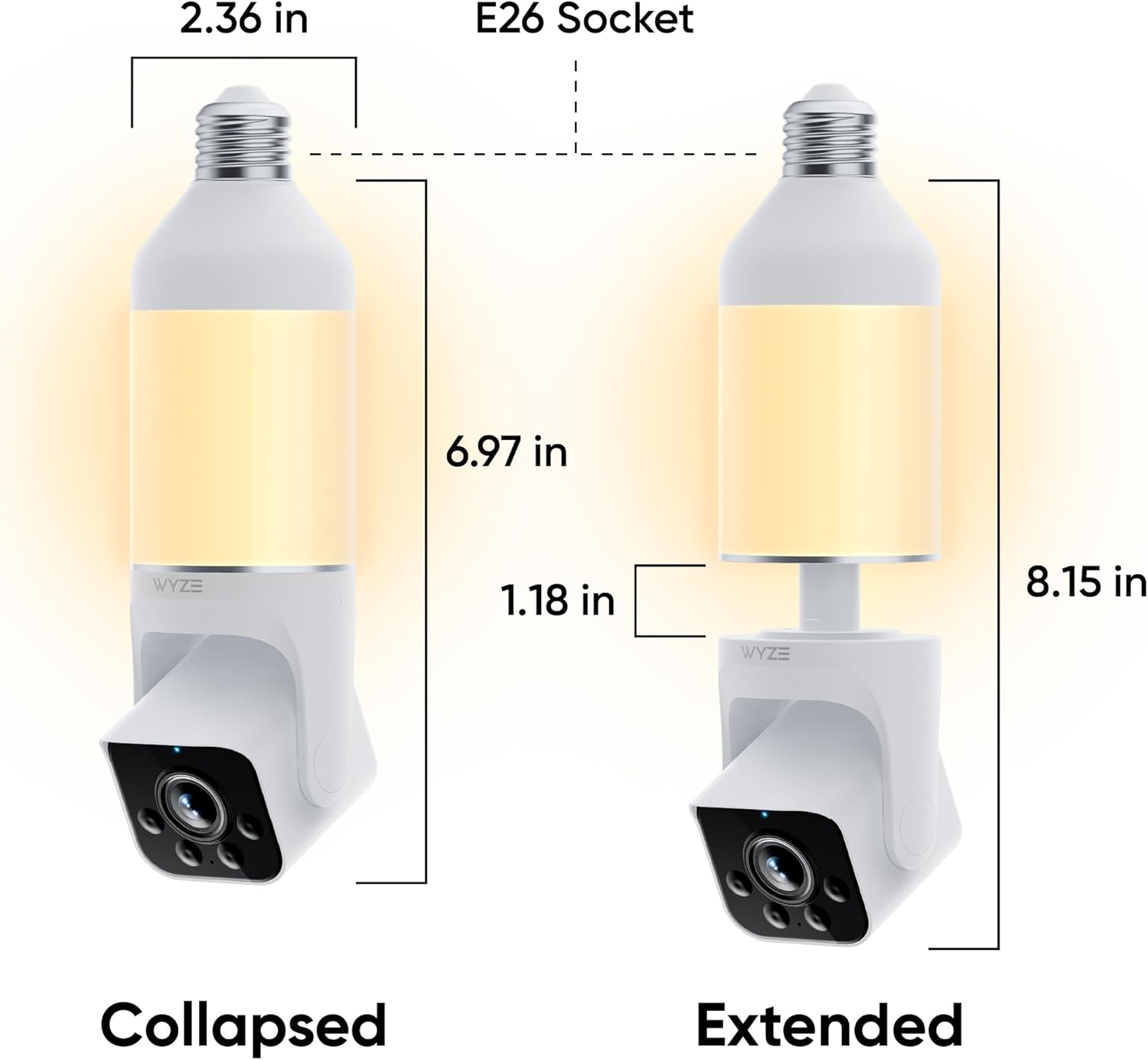
- 8.78 x 2.95 x 2.95 inches
- Peso
- 13.44 ounces
- Unit Count
- 1 Count
- Antenna Location
- Driveway & Garage Security, Front Porch & Entryway Security, Outdoor Security, Traffic & Parking Lot Monitoring
- Number of Items
- 1
- Built-In Media
- Bulb Cam
- Model Number
- WYZEC-BC
- Item Type Name
- Lightbulb Security Camera
- Fabricante
- WYZE
- Mfr Part Number
- WYZEC-BC
- Alimentación
- Light Socket Powering, E26 Socket Powering
- Potencia
- 15 watts
- Video Capture Resolution
- 2k
- Effective Video Resolution
- 1296 pixels
- Frame Rate
- 20 frames_per_second
- Night Vision Range
- 35 feet
- Night Vision
- Night Color
Ver todas las especificacionesVer menos⌄
Calificaciones
4,1
★★★★★3.658 calificaciones
Las calificaciones provienen de Amazon.com.
MMark A
3 de agosto de 2026
Very nice cameras for the money
Snap to install and setup. Work exactly as described. Good quality product and picture. Very versatile setup and customizable operating options. We put three outside and one in a window so we have coverage totally around the house. Product works best with subscription although does function satisfactorily for free using SD cards. We did get the subscription at $99/ year for unlimited cameras. That's only $8.25 a month or $2.06 per camera at 4 camera you can have as many as you want at the $99/year. Very impressed with this setup.
Excellent Camera for Light Fixtures
This is one of several cameras I’ve purchased from the Wyze Ecosystem. I bought this camera to use on a small porch attached to the lower level of my house. It works well and captures excellent pictures and videos, both during the day and at night.One thing to note is that unlike the pan/tilt cameras offered by Wyze, this camera doesn’t provide a 360-degree view of an area and needs to be manually positioned. I mistakenly assumed that I could move the camera 360 degrees, but that was my mistake, not Wyze’s.Setting up the camera is quite simple. If this is your first camera within the Wyze ecosystem, you will need to create a Wyze account or download the app. After logging into your account, you can follow the instructions provided in the app to set up the camera. This involves screwing the camera into your light fixture and ensuring that the light switch is turned on. The camera will enter setup mode and then provide instructions to pair it with the app.The camera has both night vision and a built-in LED light. The light can be controlled via the app. One thing to note is that since this camera requires power from the light socket, you’ll need to always leave your light switch “on”. Thankfully, Wyze provides a sticker stating this, which you can attach to your light switch.I live in a two-story house with my router located one floor above where this camera is installed. I haven’t had any connectivity problems, and the camera is responsive.I highly recommend this camera if you need a camera outside where you have a light fixture but don’t have an outlet.
Just get it!
We’ve owned this camera for a year and added two more plus a doorbell camera. I can’t believe the quality and ease. They installed in minutes and they don’t require a subscription!! The images are crystal clear, they have SD backup, and everything is so user friendly! I couldn’t be happier. Highly Recommend! (FYI- we did need to order an extender so the camera would sit below the base on our light fixture. The extenders were inexpensive and came in a two pack on Amazon and screwed in to the socket easily)
Works fine. Cannot pan & tilt camera electronically, only manually. Nice porch light and live view.
A good product. A little difficult getting it to work through app. One disappointment is that the camera angle has to be set and changed by hand; cannot be changed remotely through app, although from the photos I assumed you could pan it remotely. I used wires to lock it in place to prevent casual thieves from unscrewing it and stealing it from the porch. It was a little clunky setting up automatic routines for it, such as when the light is to be turned off and on. And a lot of capabilities are prevented unless you pay for a monthly subscription. But if you want a live view of a package arrival, or who is at the door, it works fine. And in theory you can record everything if you buy a SD card to stick in it; although I have yet to test out finding a past event; it would probably be difficult and time consuming... assuming some kid on the block didn't pull the SD card out of the bottom of the camera to use on their game system.



 Marca: WYZE