Logitech MX Mechanical Mini Wireless Illuminated Keyboard Tactile Quiet
Más de 200 compradas el mes pasado
-23%US$123.49
Antes: US$159.99
Precio en USD + envío por peso real. Llega en 5 a 10 días hábiles con Envi Express. Pagá en línea con tarjeta.
Más de 200 compradas el mes pasado
-23%US$123.49
Antes: US$159.99
Precio en USD + envío por peso real. Llega en 5 a 10 días hábiles con Envi Express. Pagá en línea con tarjeta.
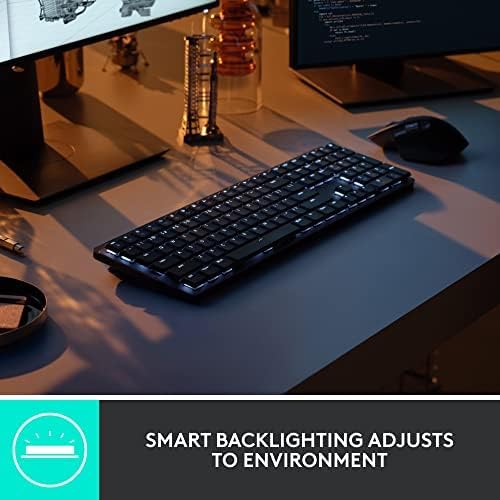
*Excludes plastic in printed wiring assembly (PWA), FFC cable, cables, and packaging. Logitech MX Mechanical Mini Minimalist Wireless Illuminated Keyboard Introducing MX Mechanical Mini- a minimalist keyboard with extraordinary feel, precision, and performance. Low-profile mechanical typing delivers satisfying feedback in your choice of key switches – Tactile Quiet, Clicky, or Linear.
MX Mechanical Mini is crafted for ergonomic comfort, with smart illumination and Easy-Switch – allowing you to connect up to 3 devices and stay in your flow for hours. 55 mm) Compatible with Windows, macOS, Linux(4), Chrome OS(4), iOS(4), iPadOS(4), Android(4) operating systems Rechargeable Li-Po (1500 mAh) battery Optional software(1): Logi Options+ Important: FileVault might be enabled on your macOS computer, which could prevent you from entering your password at start or reboot when connected to Bluetooth. In this case, use Logi Bolt USB Receiver.
Footnotes: (1) Requires Logi Options+ software, available for Windows and macOS (2) Not compatible with Logitech Unifying technology (3) Battery life may vary based on user and computing conditions (4) Device basic functions will be supported without software for operating systems other than Windows and macOS
Master Series MX Mechanical Wireless Illuminated Performance Keyboard
4,2
2.238 calificaciones
Las calificaciones provienen de Amazon.com.
Yo_Paisan
31 de enero de 2026
Never thought I'd love a keyboard so much...
It's taking a little getting used to the slightly different arrangement of some keys but man... overall, this keyboard KICKS TAIL!!! I love how it lights up, I'm always working in low light or the dark and my eyes aren't what they used to be so I just can't tell you how much of a difference it makes. I also feel like the key symbols won't/can't wear out because they're backlit. Typical keyboards have letter and words wear off over time, but I don't see how that's possible with this keyboard. It's not a "gamer keyboard" it's just a great basic keyboard with all the functions you need. Keystrokes feel amazing! Not sure how to describe but when you're typing it just feels really nice. A real quality built product and worth every penny. I'm considering buying another before they don't make them anymore... LOL Oh, the battery lasts forever on this thing too. You can turn it OFF when you're done for the day and you can set the keyboard to pair/work with multiple computers (even have keys configured differently if you like). The backlight shuts off when you remove your hands from the keyboard or stop typing for about 5 seconds, but its got this really cool "motion detection" feature that once you put your hands over the keys again or start typing it lights right back up! I'm telling you if you're in the market for a new BLUETOOTH keyboard and are willing to pay a little more for a NICE one... this is the board to have!!! I really love it. I'll give you the 1 thing I didn't like about it as I began using it... The FUNCTION ROW of keys has no space above the NUMBERS or Number pad, etc. So it's super easy to hit the wrong keys sometimes. I'll often go to use the "home" key and end up hitting the key to switch between machines, or the biggest one is the "lock" key the farthest top right key over the number pad's "minus/dash" key. I often go to hit the "minus/dash" key and end up locking my windows (having to sign in again). HOWEVER, using the Logitech software that is used to configure the keyboard I was able to just disable that lock key. I don't need a KEY for that anyway. When I want to lock my Windows session (log out) without shutting down, I'll just do it the normal way with my mouse (Start > Power > Lock). No big, been doing that forever anyway. Anyway, this keyboard is awesome. Especially, once you get used to it. Most times I get a new keyboard and have to get used to the key arrangements and different spacing anyway. Might as well do it with a great keyboard. 😊👍🏻 P.S. I have always been a Microsoft keyboard/mouse kinda guy. I didn't think much of Logitech until I got the MX Master 2 Mouse, which is now also my favorite ever. This keyboard goes with that mouse it's sold in bundles they're of the same product set.
VChu
31 de diciembre de 2025
Satisfying typing experience
I love this keyboard. I use the same monitor for my gaming PC and for my work Surface Pro. I had a wired keyboard which I had to unplug from the gaming PC and plug into the docking station every morning and then do the reverse after my work hours. It became tedious after a while, so I decided to upgrade to a wireless keyboard that can switch between multiple devices without having me crawl under my desk to do so.This one seemed not too expensive, had full width, and reviews were decent. I'm very pleased. Switching between devices is handled with 3 dedicated buttons for this specific purpose, no crawling required. I used the dongle to pair it with the gaming PC, and Bluetooth to pair it with my work computer. Now I can work from the kitchen or the yard if I want to.It's slightly louder than I expected, but is by no means clickety like some others I've used. Typing is now completely satisfying. The texture of the buttons is soft and the feedback is addictive and makes me want to type forever.As an unexpected bonus, I was able to connect the keyboard to my phone and type in mobile apps with a full keyboard!! What a novel and refreshing experience.The only complaint from my daughter is that it doesn't have colored backlight. It's just plain white.
Loki
25 de junio de 2022
Beautiful keyboard
So I just received and began to use this keyboard today. I am pretty blown away by how nice it looks, how good it feels, and just the experience overall. Compared to my previous keyboard, I already like this a fair amount more. For reference, I was using the Corsair k57 RGB wireless. Also a quite nice keyboard, but this has a much more premium feel. It's also much more professional looking, which is why I chose it as I plan to use this in an office environment. Some thoughts below.-The clicks are super nice, I've never used a "clicky" switch with feedback like this before and I quite enjoy it. Probably my favorite feedback I've had from just typing on a keyboard. The various corsair boards I've used in the past I typically chose a quiet and/or a linear switch.-Overall a very nice, professional look. I wouldn't expect any weird looks with a keyboard like this in a professional environment.-Pairing was easy, plugged in the receiver and it instantly connected; no other input needed. Even the sister product to this never did that for me, the MX master 3S mouse. I had a bit of a struggle trying to get that to pair using the included receiver, as I recall. (Otherwise one of my favorite mice, also coming from a mostly corsair brand background). There is also bluetooth pairing, if preferred. (or if the receiver refuses to work, like my MX master 3S.)One minor negative is the backlight. The first problem was even getting the keyboard to light up at all. The keys for the keyboard backlight simply did not seem to function at all, no matter if I had the FN key held or not. Puzzled, I installed logitech's software and looked for options there. No luck. A bit annoyed at this point. Luckily, their software offered me access to an upcoming beta version of their software, "Logitech Options", so I downloaded that to poke around and see if there were more settings there. As it turns out there were. Oddly, they didn't work though. The keyboard refused to light up, the keys meant to dim or brighten it doing nothing at all. As I began a search to see if this was a common issue, the backlight finally came on. No idea what changed. Pretty standard white LED backlights. Lots of pissed off customers on forums about it though. Apparently, Logitech has been pretty silent about the issue. I'd be pissed too, if my $200 keyboard didn't have a functioning backlight due to software issues.With that rambling anecdote, the backlight itself is just fine, about what I expected for a professional keyboard like this. Just clean white LEDs.In summary, a very nice looking, nice feeling premium keyboard. Pretty unassuming in a professional environment. Easy setup. Quite happy with it.Edit: The backlight does not seem to remember brightness settings between use sessions, so if you will get super annoyed or angry about having to hit brightness up each time you use, that's something to consider. Most annoyingly, if the room is deemed "too bright" by the sensor, the backlight will not turn on at all. Understandable, but I'd still like the option.
BigReg26
17 de julio de 2026
Great first mechanical keyboard
I just finished my first long work session with this keyboard. I'm glad I bought it. It's very easy to type on. It's my first mechanical keyboard of any kind. I went with the quieter version. You still get the clicking sounds, just not super loud. I finally understand what people mean when they say typing on a mechanical keyboard feels more satisfying compared to non-mechanical ones. Highly recommend this keyboard if you're looking to get into mechanical keyboards. Definitely won't be my last.