Roku Streambar Pro Stereo Soundbar Grey
Más de 50 compradas el mes pasado
Precio no disponible
Precio en USD + envío por peso real. Llega en 5 a 10 días hábiles con Envi Express. Pagá en línea con tarjeta.
Más de 50 compradas el mes pasado
Precio no disponible
Precio en USD + envío por peso real. Llega en 5 a 10 días hábiles con Envi Express. Pagá en línea con tarjeta.
Cantidad: 0
Roku Streambar Pro is the ultimate 2-in-1 entertainment upgrade with Roku streaming and cinematic sound for any TV. Upgrade to America’s #1 TV streaming platform* and enjoy a massive selection of free and live TV in vibrant 4K HDR picture quality. The customizable home screen puts your favorite channels like Netflix, Prime Video, Amazon Freevee, Disney+, HBO Max, Apple TV+, and Hulu front and center.
Enjoy an immersive audio experience with virtual surround. Crisp, clean audio makes dialogue easier to hear. You can even quiet loud commercials automatically plus stream music with Bluetooth®.
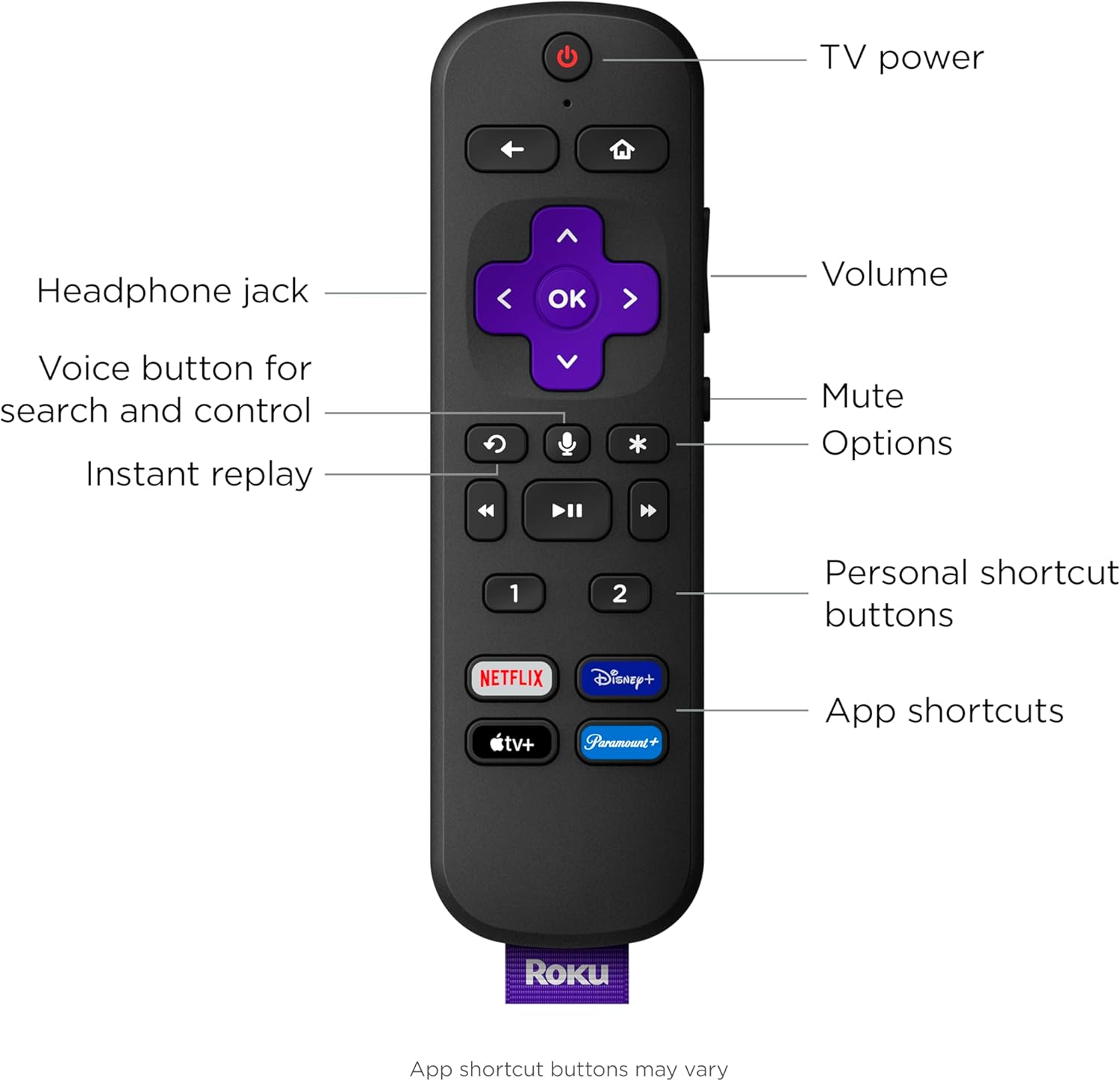
Setup is simple with everything in the box, including the Roku voice remote with that controls your TV, sound, and streaming and has personal shortcuts and a lost remote finder. For even bigger sound, add deep, rich bass with Roku Wireless Bass Pro and immersive surround sound with Roku Wireless Speakers (sold separately). Just plug in and wirelessly pair.
Roku is America’s #1 TV streaming platform based on hours streamed – Hypothesis Group, December 2022.
Roku® Streambar Pro, Two AA Duracell® batteries, Voice remote, Power Cable, Headphones, Premium High Speed HDMI® Cable, Optical cable (optional) Only use if your TV does not have an HDMI-ARC port.
4,4
3.200 calificaciones
Las calificaciones provienen de Amazon.com.
Tillnia Chicovek
25 de mayo de 2024
Was awesome/ 1yr update
Love the sound quality and the fact that the tv and device can be turned off and on with the roku remote. I had hard time hearing voices through the tv speakers and no matter the setting the tv just wasn't doing it. The set up is super easy, at least for me. I signed up for roku account on phone, then plugged this in and selected the Input. Followed the directions and in two hours I had ALL my tv apps in one place. Tv must be at least a 4k for this to work as I did have to google how to up the fps on the Input I plugged it into. The tv did the same, however with updates my apps would move or dissapear, and there was always lag between the tv remote and tv. This resolves that problem and works seamlessly. Buttons are firm and produce wonderful feedback on the roku remote. I can watch my antenna tv and still use the roku remote to flip channels and adjust volume. I love that I can plug in a headset for latenight watching and the house remains silent. Over all I love it and won't go back to watching tv without it.1yr update: I still like it, but it seems to cause issues I hadn't anticipated. First of all it wants to take over my television. No matter what I do, when the tv comes on it takes me to the roku home. I have tried settings on my tv and the device with no luck. Second, I can change the tv input or turn the tv off and the SBar doesn't register it and continues playing sound until I turn the actual device off. Third, if I do want the roku home page and press the 'home' button on the remote it randomly opens an app... I don't know what kind of updates Roku has done, but I'm disgusted. I want it to do what I hit a button for and not randomly act out on its own. I want to start my tv and make a freeking choice... Thanks Roku for ruining my experience with your decices ... I'll be removing this soon for a basic sound system that doesn't think it knows me...
Bill
28 de enero de 2023
TCL Roku TV owner takes the Roku Streambar Pro for a spin
So I spent days researching sound bars for our TCL Roku TV from the TCL made one for Roku TVs to generic sound bars to this Roku Streambar Pro. Each has pros/cons to consider and I was very frustrated the amount of time it took to find answers to things I'd think would be common sense sort of things such as why doesn't Roku make a soundbar without a Roku built in for Roku TVs (aside from the fact the TV manufacturers make them)? Or what happens when a Roku TV owner uses a Streambar or Streambar Pro since there's now a 2nd Roku sitting there for nothing? With a normal non-Roku TV it's pretty obvious it's just a matter of changing inputs but with a Roku TV the Roku IS the TV system including changing inputs.So the Pro bar feels pretty well made. It was very simply to plug in but it was frustrating the power cord was so long when I only needed to go about 3 foot with TV mounted on wall & mounting the bar below it using a kit I got off amazon. Suppose they assume many will want a long cord such as if the bar is on TV cabinet or such but those of us with wall mounted tv need shorter for simpler cable management & hiding those cables. I can probably find a 3rd party power cord that's shorter but I just wanted to test the thing out. The other frustration in mounting the bar is that the bar uses 1/4" screws but the kit came with only metric screws. Yeah that's more on the kit people but TV mounts use metric.. I used the included HDMI cable & plugged into the ARC HDMI port in part because there's a note on the cable that's what should be used. Powered on the tv & like magic the TCL Roku tv saw the bar & it told me I wouldn't need the remote that came with the bar (I assume because it's a Roku TV & plugged into ARC port). So I used the original TV remote & walked thru the simple wizard which most of the time was waiting on it to do forced auto-updates before it would continue. When done it played a demo video which there was no obvious way to cancel but home button did the trick. I was back at the TCL Roku home screen with nothing obviously different besides when changing volume the icon was different (shows a tiny sound bar) and it was obvious the sound was much better & coming out of the bar now instead of the tv speakers. So it appeared I was done.. No sign of the bar's Roku or the HDMI port I plugged it into. HDMI4 was missing now! So that answers the one nagging question of what happens on Roku TV & that's it acts like a stand-alone bar if you choose to leave it that way. I wanted to dig in more so in settings I found HDMI4 set as hidden so i changed that & voila! there was now a new input called Roku Streambar Pro. Cooler yet when i moved to it it showed a thumbnail preview of the other roku like picture in picture. I chose it & there was the new "hidden" Roku. And like magic there were all my apps! But the tv remote no longer worked for anything but tv functions like volume. I had to add batteries to the new remote & use that. Hitting Hom on the TV remote took me to the TV Roku home. Hitting home on new Roku remote alerted me it was taking me to the Streambar Roku with a timer to cancel. Once playing with the new Roku I found that one got setup by the roku tv & roku system without any input/help from me for Wifi, Roku acct login etc. Cool but tad concerning from security/privacy standpoint at the same time.. So both remotes power tv on & off, both volumes control the volume but each remote controls only the respective Roku. This does make sense in hindsight but nice to know & makes me wonder why Roku doesn't document how it works for Roku TV owners. It also answers why they don't sell a bar without a Roku since that new Roku is basically hidden & not used unless you go looking for it (or happen to setup the new remote & hit keys..) But is it?.. Setting up bluetooth streaming Pandora from phone told me otherwise. I added the phone in the TV Roku settings & like magic I could hear the music despite the TV Roku home screen up. Odd.. No controls. No info. Just music playing. I went to the bar Roku while it was playing & there it was! the bluetooth player "channel" was up on that Roku but hidden from view except I had un-hidden it. Others who had not wouldn't even realize that was there & would miss out on part of the experience. Non Roku TV users would have enjoyed the full experience since they'd probably be using the new built in roku. So it made me wonder why not just use the bar's roku instead of the tv's roku? For one anyone who uses other inputs MUST use the Tv's roku. If you ONLY roku that's moot. Same if you use the HD tuner, you'd have to use the TV Roku. Since it's mounted on wall only use Roku so yeah why not?! I did some testing & the menus seems comparison in speed. Apps/channels seems comparable. Then I started a movie on Disney plus & wow did it look much worse on the bar roku vs the tv roku.. On the tv it was bright & very detailed. On the bar it was dark & grainy. The hint was the tv splashed "Dolby Vision" when starting the movie & the bar flashed "HDR". Bummer the bar does not support Dolby Vision :( The movie looked so much worse it was no brainer that using the TV roku was the best option & switch to the bar roku if streaming Pandora & wanting to see the info/status. But I had to dig in more & glad i did. On the bar Roku in display settings it was Auto by default & there was UHD 4K HDR! I set it to 4K non-HDR & wow the D+ movie looked great now! Basically on par with the TV's Roku with Dolby Vision but not quite.. So close most people would probably find it close enough. To me the Dolby Vision was a touch better but not enough to avoid using the bar's Roku at this point and I seemed to answer all my questions except how good does the bar sound.. Streaming Pandora from an Android had me worried because it was pretty flat & tinny no matter what sound settings I chose. The music preset was near impossible to hear without turning volume wayyy up (btw the volume changes lag with either Roku compared to built in sound which was a bit annoying since it took so long to turn it up to hear then back down). I gave up on Pandora & found a streaming music channel on Roku Spectrum app. HOLY COW it was pretty fantastic! WAYY better than the sound of Pandora to point if I had only tried Pandora I would have thought this bar stunk. If it was Pandora or streaming over bluetooth or what I'm not sure but there was definitely a very noticeable difference. Now using the streaming channel it sounds fantastic, especially compared to the TCL built in speakers and after a little tweaking of sound settings on the * menu. Music sounds best with defaults but enable surround drop treble 1 notch & bunch bass a couple.. Oddly enough for tv it sounded better (could hear the people better without "distortion" from the sounds) with surround off. I figure it depends on what we're watching. I'm very pleased with choosing the Streambar Pro at this point & would recommend it to Roku TV or non-Roku TV users alike now that I've answered the questions that kept me from ordering it until now.
Just_the_facts
15 de enero de 2024
Best for your money
Went through sonos, sony, and finally settled on Roku for the sound bar selection. The sonos ray, sounded like crap. The sony HTX-8500 for my sony bravia TV with "Bravia-Sync " has CEC, but it has no hdmi ARC, so had to use s/pdif (optical) cable for audio, was actually nice, because my TV's remote (volume worked) but the htx-8500 sounded like you were in an echo chamber -- the quality was laughable-poor... it was complete junk, for near 300 bucks. Returned both the sonos and sony and got the Roku Streambar Pro. Now, if you're looking for a soundbar with fantastic bass, then this Roku streambar pro is Not for you. If you are looking for a SIMPLE soundbar under 200 bucks (tax included) then this is the best you'll find for the money What I found with all these under 300 dollar sound bars, is the Audio was terrible (for watching the News, Movies, etc). Roku was the exception to the "poor audio" findings. I also bought a roku wireless soundbar (hooked up to my TCL-roku TV) before buying the Stream bar PRO for my old relic Sony Bravia TV. BOTH of these Roku sound bars are way the he^^ better than the sony or sonos. The Title is: "best for your money".... Title doesn't read: "best sound bar on the planet". If you want a really good sound bar, then spend $1000. If you want the best for under two hundred bucks, then roku is the answer. Man, I wish I read this Review [OF MINE - posted by someone else] ***before*** I wasted LOADS of time with buying & returning prior sound bars. The fact that you can put GOOD QUALITY wired ear buds connected to the roku remote, is a very cool feature too, for Late Night Movies, without pissing-off your spouse, with the movie volume cranked-up.
Janet L. Knapp
14 de julio de 2023
Another great Roku product!
You simply cannot beat the Roku brand for its operating system, ease of setup and ease of use. Their products are always well packaged, inclusive of everything needed to get up and running in minutes, and their instruction booklets and online tutorials show just how easy it is to set up. I recently purcased a new LG Smart TV, and I couldn't stand the operating system, so decided to go back to using an external Roku, which I've used for years. And my soundbar with subwoofer wouldn't work with my new TV, so moved the soundbar and subwoofer to the bedroom TV and began my search for a good replacement soundbar. This Roku Soundbar Pro fit the bill since it incorporates both the Roku operating system with the soundbar all in one unit. Its sound is superior to my TV and with the added built in Roku, I didn't need to fuss with additional inputs for both Roku and external soundbar. And it was easy to pair the Roku remote with my LG TV and allow me to use one single remote for TV power on/off, Roku OS, and Soundbar volume. Had to take off one star because the bass is not quite what I prefer (I like the rumble and deep, richer bass tones that cannot be replicated on this soundbar - unfortunately, I guess that requires a subwoofer when watching movies and listening to music) so will need to upgrade at some point to add on the Roku subwoofer, but the sound is otherwise quite good as is. I particularly like the feature that lowers the volume during commercials - something that before this Soundbar was quite annoying when watching Yellowstone, for example! Commercials would blast you out of the house! That's a very nice feature of this Soundbar Pro! You can also easily modify the sound with the push of a few buttons when watching TV at night so that movies that often get loud during certain scenes are quited down so as not to wake up the whole house. Also like that it integrates well with Alexa. Overall, very pleased with this purchase.